Capacity | |||||
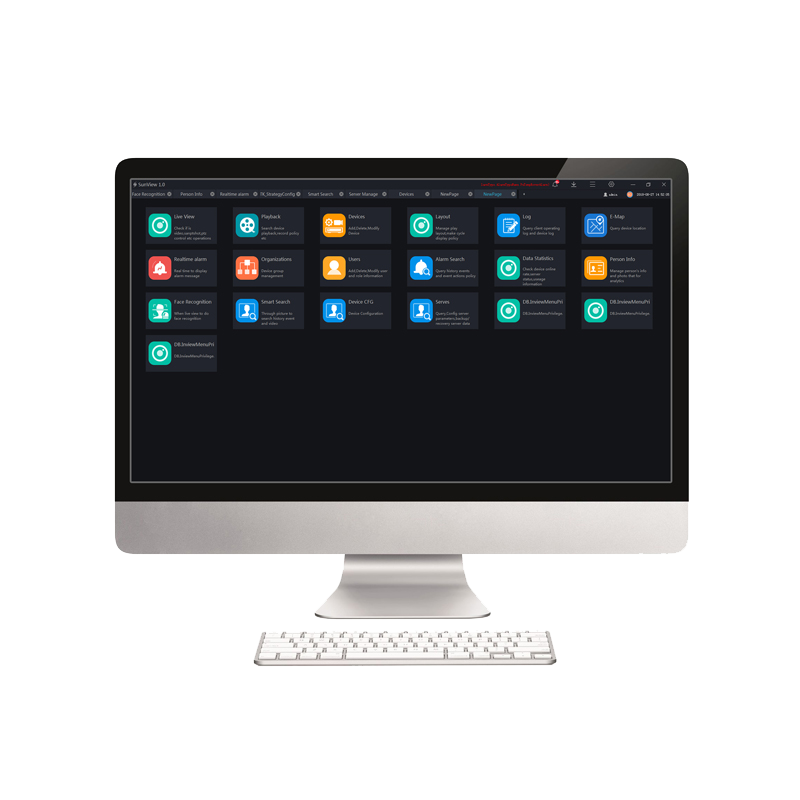
Maximum Number Of Cameras | Up to 10000+ channels | ||||
User | Up to 5000 Users | ||||
Roles for each User | Unlimited | ||||
Live View | |||||
Screen Layout | 1/ 4 /6 /8 /9 /16 /25 /32 /36 /64 layout 1/ 4 /6 /8 /9 /16 /32 /64 custom layout | ||||
PTZ Control | Pan, Tilt, Zoom, Edit and control, Zoom+, Zoom-, IRIS +,IRIS-, Near focus, Far focus, Focus, Orientation, Wiper, Turn on the light, Cruise, Preset | ||||
Image | Brightness, Sharpness, Saturation, Contrast | ||||
Features | Close View, Start Audio, Start Intercom, Start Record, Snapshot, Continuous Snapshot, Window Ratio, Restore, Start 3D, Full Screen, Hardware Acceleration, Open Mouse Thermometry, Show Area Temperature | ||||
Playback | |||||
Playback | NVR recording playback Playback maximum 16 channels under several modes & full screen. | ||||
Function and Feature | Recording schedule, Rewind, Pause/Play, Stop, Next frame, -8x~8x speed for forward and backward, Layout display, Full screen, Download, Select progress bar format | ||||
Alarm | |||||
Real-Time Alarm | Alarm display, Alarm processing, Alarm operation, Interface display, Toolbar alarm shortcut settings | ||||
Alarm Search | Time, Type, Processing status, Device name, Operation, Alarm information, Interface display setting | ||||
E-map | |||||
Format | PNG/XPM/JPG | ||||
Map Alarm | Alarm flash | ||||
Features | Hot spot, map zoom in/out | ||||
User Management | |||||
User Management | Add, Delete User and Role Edit and Delete User, Query user | ||||
User Level | Administrator, Operator | ||||
User Info | User name, password, user level, permissions Different default permissions for different user levels Assignable permission(s) of each IPC | ||||
Privilege | Menu Privilege, Channel Privilege, Face Library Privilege | ||||
System Configuration | |||||
Base Setting | Login, alarm message, language, initial page set, video proportion, decoding method, default stream | ||||
File Path | Configuration picture and video save path | ||||
Hotkey Setting | Configuration help documentation, preview full screen, playback, real time alarm, system configuration, user management, device management, capture, lock screen, switch users, turn on/off alarm sound, start/stop record shortcut key. | ||||
Capture Setting | Setting capture interval | ||||
Log Export | Configuration log export path | ||||
System Requirements | |||||
Name | PC Client | Central Management Server | Media Distribution Server | Intelligent Analysis Server(CPU environment) | Intelligent Analysis Server(CPU environment) |
CPU | Intel® Core™ i5-7500 or better | Intel® Core™ i5-7500 or better | Intel® Core™ i5-7500 or better | Intel® Core™ i7 or better | Intel® Core™ i7 or better |
RAM | 8 GB or more | 8 GB or more | 8 GB or more | 8 GB or more | 8 GB or more |
Network Card | Gigabit/s | Gigabit/s | Gigabit/s | Gigabit/s | Gigabit/s |
HDD | 50 GB or Above | 50 GB or Above | 50 GB or Above | 50 GB or Above | 50 GB or Above |
OS | Microsoft® Windows® 7 Pro (64 bit) Microsoft® Windows® 10 Pro (64 bit) Microsoft® Windows® 10 Enterprise (64 bit) Microsoft® Windows® Server 2012 Microsoft® Windows® Server 2016 | ||||
Software | DirectX 11 or above | — | — | — | — |
Display Resolution | 1600×960 and above, default 1920x1080 | — | — | — | — |
Video Card | — | — | — | — | — |
GPU | — | — | — | — | NVIDIA GTX 1050 or better |

-
ผลิตภัณฑ์
ผลิตภัณฑ์
ซีรี่ส์การป้องปรามที่ใช้งานอยู่
กล้อง ANPR
ซีรีส์ NightHawk
ซีรีส์พาโนรามา
กล้อง IP รุ่น Ultra
กล้อง IP Pro Series
กล้อง IP ซีรีส์ Eco
กล้อง IP Lite Series
ซีรี่ส์พิเศษ
กล้องถ่ายภาพความร้อนคงที่
กล้องถ่ายภาพความร้อน Bullet
กล้องถ่ายภาพความร้อนป้อมปืน
กล้องโดมความเร็ว
กล้องถ่ายภาพความร้อน PT
กล้องเครือข่ายป้องกันการระเบิด
กล้องถ่ายภาพความร้อนป้องกันการระเบิด
กล้องเครือข่ายป้องกันการกัดกร่อน
-
เทคโนโลยี
เทคโนโลยี
NightHawk - เทคโนโลยี AI ISP แสงน้อยพิเศษ - NightHawk เทคโนโลยีแผนที่ความร้อน การตรวจจับการเคลื่อนไหวอัจฉริยะ ไฟส่องสว่างคู่อัจฉริยะสีเต็มรูปแบบ เทคโนโลยีการป้องปรามอัจฉริยะ สีเต็มรูปแบบ สมาร์ท IR II การติดตามอัตโนมัติ เทคโนโลยีการถ่ายภาพความร้อน เทคโนโลยีแสงดาว ช่วงไดนามิกกว้าง สมาร์ท IR การเฝ้าระวังแบบพาโนรามา - โซ ลู ชั่น
- เกี่ยวกับเรา
- สนับสนุน
- กด
- ติดต่อเรา
-
-
Thai - ภาษาไทย