Account Management | |
Account Management | Register a new account via email address |
Account login and logout | |
Change account password | |
Reset account password | |
Login by fingerprint authentication | |
Associated User Management | |
Synchronize local device to cloud account | |
Synchronize cloud device to local | |
Delete account permanently | |
Device Management | |
Device Management | Supports IPC, NVR, DVR |
Supports adding the devices via auto search (LAN), manual adding (IP/Domain, DDNS) and QR code scanning | |
Edit/delete devices | |
Edit device name | |
Remote configuration maintenance to devices | |
Live View | |
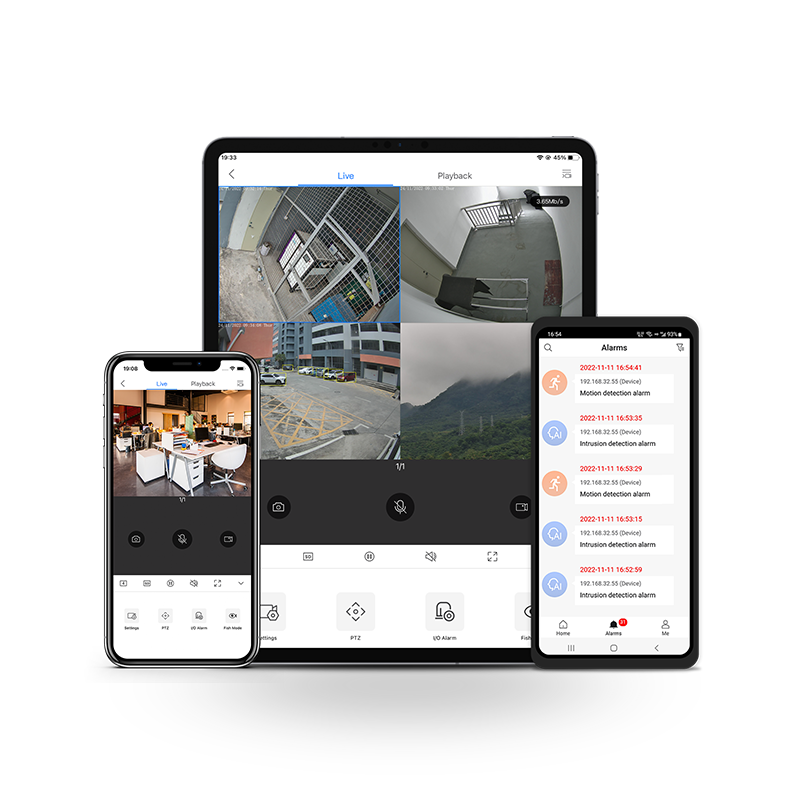
Live View | 1/4/9/16 display layouts |
Change live view quality: HD or SD | |
Two-way audio | |
Full-screen mode | |
PTZ control | |
I/O alarm | |
Fisheye dewarping | |
Digital zoom | |
Snapshots and videos can be saved to the mobile phone | |
Playback | |
Playback | Search by calendar, select the data to playback Support to select a specific time to playback Drag the timeline to search |
Search videos by time | |
Up to 4 channels of simultaneous playback | |
1 or 4 window division | |
Control audio | |
Capture and recording | |
Drag timeline to set playback start time | |
Adjust playback speed | |
Download video footage to the mobile phone | |
Alarm Notification | |
Alarm Notification | Receive alarm (event) notifications |
View alarm (event) information and related videos | |
Alarm search can be filtered by device, alarm time and alarm type. | |
Alarms can be filtered by device. | |
Support multiple alarm notification types | |
Remote Configuration | |
Remote Configuration | Draw privacy masking area for network cameras |
Configure image adjustment and day/night mode for network camera | |
Configure network setting for device | |
Configure language, time and time zone for device | |
Change device password | |
Configure motion detection, intrusion and line crossing detection for specific network camera | |
Display storage status and device version | |
Add devices to Favorites | |
Favorites | |
Favorites | User can save cameras to Favorites during live view. |
Allows user to add, edit, delete Favorites | |
User can start live view by one tap of the favorite. | |
Language | |
Language | English, Simplified Chinese, Russian, French, Korean, Spanish, Polish, Czech, Danish, Italian, Dutch, Traditional Chinese, Portuguese, Hebraism, Finnish, German, Turkish |
System Requirements | |
Operating system | Supports iOS (10.0 or later) and Android (5.0 or later). |